Free Windows download

Download AI text to speech software for Windows.

Install VoiceCraft TTS on Windows 10 or Windows 11 and create English, Hindi and Bengali voiceovers for YouTube videos, online classes, reels, product demos and local business announcements.

Before you install

  • Windows 10 or Windows 11 64-bit PC
  • 4 GB RAM minimum, 8 GB recommended
  • 200 MB free storage for the app and exports
  • Internet required for sign in, activation and online voices
Real software preview

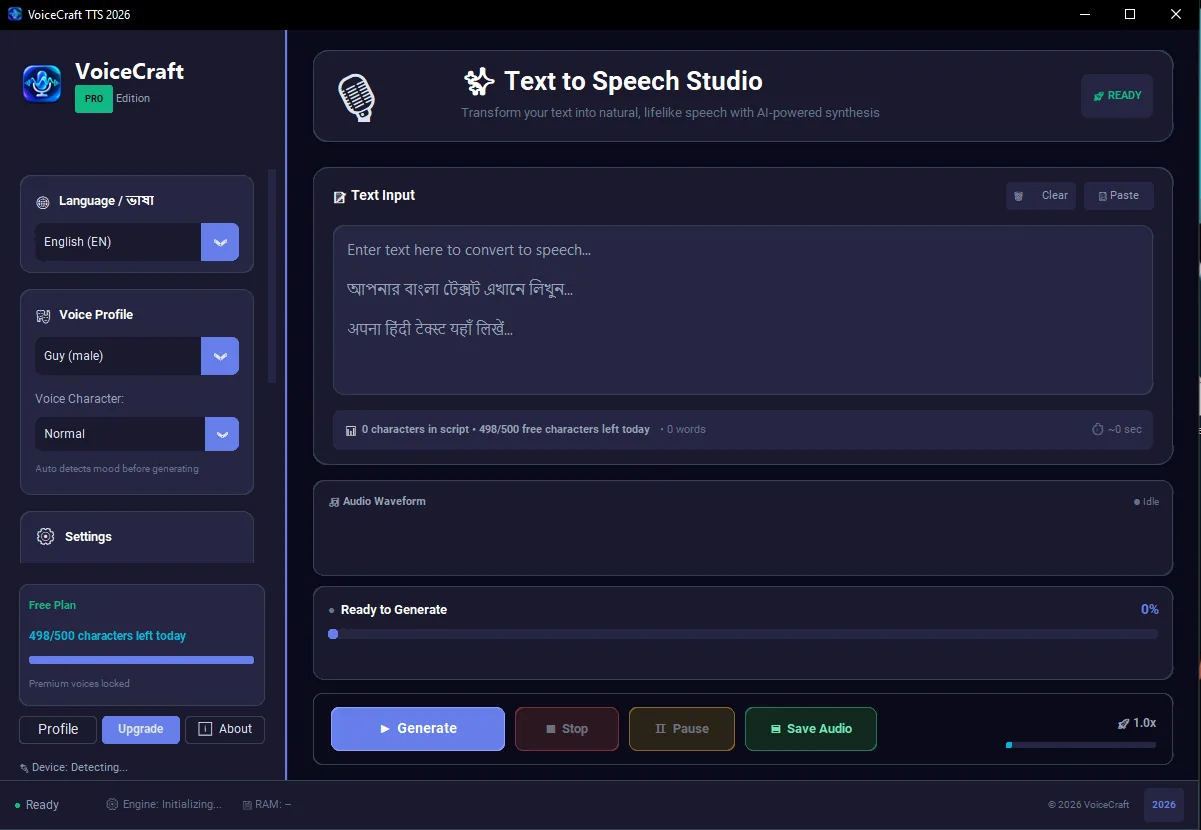
See the actual VoiceCraft TTS workspace before you install.

VoiceCraft is not only a landing page promise. The Windows app gives you a focused studio with language selection, voice profile, daily free character tracking, preview controls and clean export actions in one screen.

500 free characters dailyHindi, Bengali and English workflowMP3/WAV creator export
Actual VoiceCraft TTS Windows app interface with text input, voice profile, free plan usage and audio export controls
Creator workflow

From script to audio without a complicated studio setup.

VoiceCraft TTS is built for people who publish regularly and need a repeatable desktop workflow, not a one-time demo tool.

1. Paste your script

Prepare video narration, lesson text, ad copy or devotional content in English, Hindi or Bengali.

2. Preview the voice

Test pacing and clarity before exporting, so your final audio fits the tone of your content.

3. Export and publish

Save audio for YouTube editing, classroom material, business videos, reels and training content.

Why desktop TTS?

A Windows voice generator keeps production fast when you create often.

Browser tools are fine for quick tests. A desktop text to speech app is better when you manage longer scripts, repeat content formats, compare voices and keep exports organized on your own PC.

YouTube creatorsFaceless video narration, Shorts, explainers and news-style scripts
TeachersReading passages, course voiceovers and multilingual lesson audio
Business teamsProduct demos, customer education, ads and internal announcements
Page-Specific Guide

Windows download and setup guide

This download page should help visitors understand what they are installing, how to test the free daily allowance and how to keep their first export smooth.

Windows text to speech download

For Windows download and setup guide, The download experience should answer practical questions before the user clicks the installer. VoiceCraft TTS is built as a Windows app for script based narration, so the user should know that the first test can be done with the free daily allowance. This reduces wrong expectations and helps the visitor decide with the actual workflow.

In the context of Windows text to speech download, After installation, the user can paste a short script, choose a voice and export an audio sample. Testing a real paragraph is better than judging a tool from screenshots. It shows whether pronunciation, pacing and export format match the user project.

AI voiceover app installer

For Windows download and setup guide, After installation, the user can paste a short script, choose a voice and export an audio sample. Testing a real paragraph is better than judging a tool from screenshots. It shows whether pronunciation, pacing and export format match the user project.

In the context of AI voiceover app installer, For creators working on YouTube videos, courses or business announcements, a desktop workflow also keeps files easier to manage. Scripts, exported MP3 or WAV files and video assets can stay in the same local project folder.

free daily TTS limit

For Windows download and setup guide, For creators working on YouTube videos, courses or business announcements, a desktop workflow also keeps files easier to manage. Scripts, exported MP3 or WAV files and video assets can stay in the same local project folder.

In the context of free daily TTS limit, The download experience should answer practical questions before the user clicks the installer. VoiceCraft TTS is built as a Windows app for script based narration, so the user should know that the first test can be done with the free daily allowance. This reduces wrong expectations and helps the visitor decide with the actual workflow.

MP3 WAV export setup

For Windows download and setup guide, The download experience should answer practical questions before the user clicks the installer. VoiceCraft TTS is built as a Windows app for script based narration, so the user should know that the first test can be done with the free daily allowance. This reduces wrong expectations and helps the visitor decide with the actual workflow.

In the context of MP3 WAV export setup, After installation, the user can paste a short script, choose a voice and export an audio sample. Testing a real paragraph is better than judging a tool from screenshots. It shows whether pronunciation, pacing and export format match the user project.

Workflow Detail

Professional workflow notes

Windows download and setup guide is expanded with practical context for this page only. This helps the page stay useful for readers and avoids copied SEO filler.

MP3 WAV export setup workflow

MP3 WAV export setup is discussed here only where it supports windows download and setup guide. For creators working on YouTube videos, courses or business announcements, a desktop workflow also keeps files easier to manage. Scripts, exported MP3 or WAV files and video assets can stay in the same local project folder.

This download page should help visitors understand what they are installing, how to test the free daily allowance and how to keep their first export smooth. For this URL, the keyword coverage stays tied to MP3 WAV export setup and the user action expected from this page.

free daily TTS limit workflow

free daily TTS limit is discussed here only where it supports windows download and setup guide. The download experience should answer practical questions before the user clicks the installer. VoiceCraft TTS is built as a Windows app for script based narration, so the user should know that the first test can be done with the free daily allowance. This reduces wrong expectations and helps the visitor decide with the actual workflow.

This download page should help visitors understand what they are installing, how to test the free daily allowance and how to keep their first export smooth. For this URL, the keyword coverage stays tied to free daily TTS limit and the user action expected from this page.

AI voiceover app installer workflow

AI voiceover app installer is discussed here only where it supports windows download and setup guide. After installation, the user can paste a short script, choose a voice and export an audio sample. Testing a real paragraph is better than judging a tool from screenshots. It shows whether pronunciation, pacing and export format match the user project.

This download page should help visitors understand what they are installing, how to test the free daily allowance and how to keep their first export smooth. For this URL, the keyword coverage stays tied to AI voiceover app installer and the user action expected from this page.

Windows text to speech download workflow

Windows text to speech download is discussed here only where it supports windows download and setup guide. For creators working on YouTube videos, courses or business announcements, a desktop workflow also keeps files easier to manage. Scripts, exported MP3 or WAV files and video assets can stay in the same local project folder.

This download page should help visitors understand what they are installing, how to test the free daily allowance and how to keep their first export smooth. For this URL, the keyword coverage stays tied to Windows text to speech download and the user action expected from this page.

Practical FAQ

Questions this page answers

Windows download and setup guide has its own FAQ so this URL is useful on its own and does not depend on repeated sitewide SEO filler.

Is this page written for real users?

Yes. Windows download and setup guide answers a specific visitor intent: The download experience should answer practical questions before the user clicks the installer. VoiceCraft TTS is built as a Windows app for script based narration, so the user should know that the first test can be done with the free daily allowance. This reduces wrong expectations and helps the visitor decide with the actual workflow.

How does activation work?

For this page topic, activation is explained practically. For creators working on YouTube videos, courses or business announcements, a desktop workflow also keeps files easier to manage. Scripts, exported MP3 or WAV files and video assets can stay in the same local project folder.

What should users test first?

Before making a decision from Windows download and setup guide, users should test a real script. After installation, the user can paste a short script, choose a voice and export an audio sample. Testing a real paragraph is better than judging a tool from screenshots. It shows whether pronunciation, pacing and export format match the user project.

Why does this content mention keywords?

The page covers Windows text to speech download, AI voiceover app installer, free daily TTS limit, MP3 WAV export setup because these searches match the user intent for this specific page.