Hindi AI voice generator for Windows

Hindi scripts को clear, publish-ready voiceover में बदलें।

VoiceCraft TTS उन creators, teachers और businesses के लिए है जिन्हें Hindi, English और Bengali narration बार-बार बनानी होती है। YouTube explainers, reels, lessons, product demos और local ads के लिए script paste करें, voice preview करें और audio export करें।

3Languages
50+Voice options
No keysAccount activation
VoiceCraft TTS
अपनी script paste करें, voice चुनें और polished audio export करें।
Voice: Hindi FemaleExport: MP3/WAV
Real software preview

Install ???? ?? ???? actual VoiceCraft TTS workspace ??????

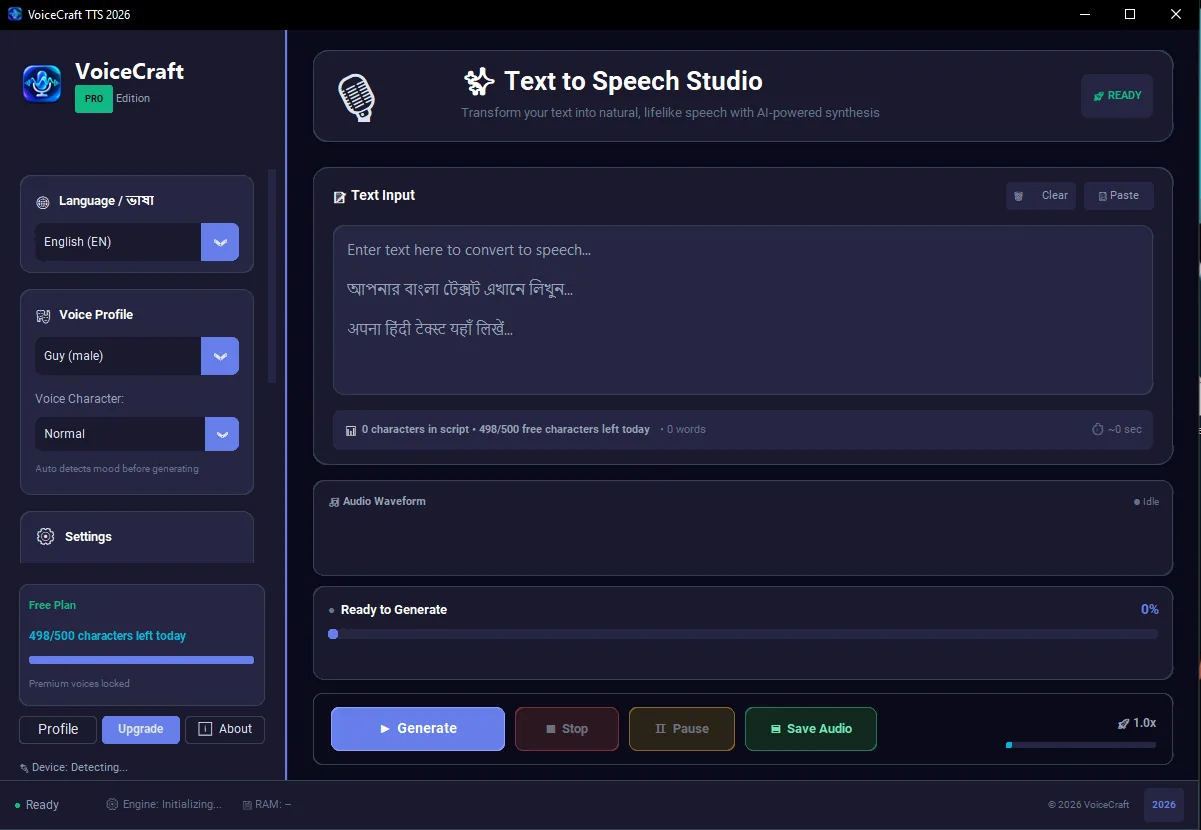
Windows app ??? language selection, voice profile, 500 free characters daily tracking, preview controls ?? audio export actions ?? ??? studio screen ??? ????? ????

Daily 500 free charactersHindi, Bengali ?? English workflowMP3/WAV export
Actual VoiceCraft TTS Windows app interface showing Hindi text to speech controls, voice profile and export buttons
Built for regular publishing

Hindi text to speech सिर्फ demo नहीं, पूरा content workflow है।

हर video के लिए recording setup करना, noise clean करना और retake लेना time-consuming होता है। VoiceCraft TTS script-based narration workflow देता है ताकि आप content planning, editing और publishing पर ज्यादा focus कर सकें।

YouTube और reels

Faceless videos, explainers, Shorts, news-style content और product review narration के लिए consistent Hindi voiceover बनाएं।

Teachers और courses

Reading passages, lesson audio, online class material और bilingual education content को जल्दी audio में बदलें।

Business audio

Local ads, product demos, customer education, shop announcements और training scripts के लिए professional narration तैयार करें।

Account activation

Payment के बाद कोई activation code copy-paste नहीं।

Checkout complete होने के बाद backend payment verify करता है और आपका Firebase account Starter, Pro या Business plan में update होता है। Desktop app refresh होते ही paid features unlock हो जाते हैं।

Step 1Windows app download करें और account से sign in करें।
Step 2Pricing page से plan choose करके Cashfree checkout complete करें।
Step 3App में plan refresh करें और voiceover export शुरू करें।

Hindi YouTube narration

Script-heavy channels, explainer videos, tutorials और Shorts के लिए narration को repeatable process बनाएं। VoiceCraft TTS आपको हर video के लिए microphone setup पर depend नहीं रहने देता।

Local business content

Shop offers, product explainers, customer education और social ads के लिए Hindi audio जल्दी तैयार करें।

Education workflow

Teachers reading passages, lesson summaries, exam explainers और multilingual class material को audio में बदल सकते हैं।

Page-Specific Guide

Creator workflow overview

VoiceCraft TTS उन creators के लिए है जिन्हें video, lesson, reels और business message के लिए repeatable narration workflow चाहिए।

हिंदी text to speech software

For Creator workflow overview, Creator workflow overview VoiceCraft TTS page का focus clear रखता है ताकि visitor को वही जानकारी मिले जिसकी उसे जरूरत है। यह content केवल keyword भरने के लिए नहीं है, बल्कि real workflow, account activation और Windows voiceover production को समझाने के लिए लिखा गया है।

In the context of हिंदी text to speech software, VoiceCraft TTS उन creators के लिए है जिन्हें video, lesson, reels और business message के लिए repeatable narration workflow चाहिए। User script paste कर सकता है, voice select कर सकता है, audio preview कर सकता है और export file को video editor, course folder या business project में use कर सकता है।

regional creator voiceover

For Creator workflow overview, VoiceCraft TTS उन creators के लिए है जिन्हें video, lesson, reels और business message के लिए repeatable narration workflow चाहिए। User script paste कर सकता है, voice select कर सकता है, audio preview कर सकता है और export file को video editor, course folder या business project में use कर सकता है।

In the context of regional creator voiceover, Creator workflow overview में free daily limit testing के लिए explain की गई है। Paid plan regular publishing, larger usage और account based activation के लिए useful है। Payment verify होने के बाद plan account से जुड़ता है और app refresh करके current status दिखा सकता है।

Hindi Bengali English narration

For Creator workflow overview, Creator workflow overview में free daily limit testing के लिए explain की गई है। Paid plan regular publishing, larger usage और account based activation के लिए useful है। Payment verify होने के बाद plan account से जुड़ता है और app refresh करके current status दिखा सकता है।

In the context of Hindi Bengali English narration, Creator workflow overview Hindi, Bengali और English narration workflow को इस page के context में explain करता है। एक creator tutorial, class, reels, announcement और product demo के लिए अलग-अलग scripts बना सकता है, लेकिन workflow same रख सकता है।

Windows AI voiceover app

For Creator workflow overview, Creator workflow overview Hindi, Bengali और English narration workflow को इस page के context में explain करता है। एक creator tutorial, class, reels, announcement और product demo के लिए अलग-अलग scripts बना सकता है, लेकिन workflow same रख सकता है।

In the context of Windows AI voiceover app, Creator workflow overview VoiceCraft TTS page का focus clear रखता है ताकि visitor को वही जानकारी मिले जिसकी उसे जरूरत है। यह content केवल keyword भरने के लिए नहीं है, बल्कि real workflow, account activation और Windows voiceover production को समझाने के लिए लिखा गया है।

Workflow Detail

Professional workflow notes

Creator workflow overview is expanded with practical context for this page only. This helps the page stay useful for readers and avoids copied SEO filler.

Windows AI voiceover app workflow

Windows AI voiceover app is discussed here only where it supports creator workflow overview. Creator workflow overview में free daily limit testing के लिए explain की गई है। Paid plan regular publishing, larger usage और account based activation के लिए useful है। Payment verify होने के बाद plan account से जुड़ता है और app refresh करके current status दिखा सकता है।

VoiceCraft TTS उन creators के लिए है जिन्हें video, lesson, reels और business message के लिए repeatable narration workflow चाहिए। For this URL, the keyword coverage stays tied to Windows AI voiceover app and the user action expected from this page.

Hindi Bengali English narration workflow

Hindi Bengali English narration is discussed here only where it supports creator workflow overview. Creator workflow overview Hindi, Bengali और English narration workflow को इस page के context में explain करता है। एक creator tutorial, class, reels, announcement और product demo के लिए अलग-अलग scripts बना सकता है, लेकिन workflow same रख सकता है।

VoiceCraft TTS उन creators के लिए है जिन्हें video, lesson, reels और business message के लिए repeatable narration workflow चाहिए। For this URL, the keyword coverage stays tied to Hindi Bengali English narration and the user action expected from this page.

regional creator voiceover workflow

regional creator voiceover is discussed here only where it supports creator workflow overview. Creator workflow overview VoiceCraft TTS page का focus clear रखता है ताकि visitor को वही जानकारी मिले जिसकी उसे जरूरत है। यह content केवल keyword भरने के लिए नहीं है, बल्कि real workflow, account activation और Windows voiceover production को समझाने के लिए लिखा गया है।

VoiceCraft TTS उन creators के लिए है जिन्हें video, lesson, reels और business message के लिए repeatable narration workflow चाहिए। For this URL, the keyword coverage stays tied to regional creator voiceover and the user action expected from this page.

हिंदी text to speech software workflow

हिंदी text to speech software is discussed here only where it supports creator workflow overview. VoiceCraft TTS उन creators के लिए है जिन्हें video, lesson, reels और business message के लिए repeatable narration workflow चाहिए। User script paste कर सकता है, voice select कर सकता है, audio preview कर सकता है और export file को video editor, course folder या business project में use कर सकता है।

VoiceCraft TTS उन creators के लिए है जिन्हें video, lesson, reels और business message के लिए repeatable narration workflow चाहिए। For this URL, the keyword coverage stays tied to हिंदी text to speech software and the user action expected from this page.

Practical FAQ

Questions this page answers

Creator workflow overview has its own FAQ so this URL is useful on its own and does not depend on repeated sitewide SEO filler.

Is this page written for real users?

Yes. Creator workflow overview answers a specific visitor intent: Creator workflow overview VoiceCraft TTS page का focus clear रखता है ताकि visitor को वही जानकारी मिले जिसकी उसे जरूरत है। यह content केवल keyword भरने के लिए नहीं है, बल्कि real workflow, account activation और Windows voiceover production को समझाने के लिए लिखा गया है।

How does activation work?

For this page topic, activation is explained practically. Creator workflow overview में free daily limit testing के लिए explain की गई है। Paid plan regular publishing, larger usage और account based activation के लिए useful है। Payment verify होने के बाद plan account से जुड़ता है और app refresh करके current status दिखा सकता है।

What should users test first?

Before making a decision from Creator workflow overview, users should test a real script. VoiceCraft TTS उन creators के लिए है जिन्हें video, lesson, reels और business message के लिए repeatable narration workflow चाहिए। User script paste कर सकता है, voice select कर सकता है, audio preview कर सकता है और export file को video editor, course folder या business project में use कर सकता है।

Why does this content mention keywords?

The page covers हिंदी text to speech software, regional creator voiceover, Hindi Bengali English narration, Windows AI voiceover app because these searches match the user intent for this specific page.