Choose the right AI voiceover plan for your content workflow.
Start with the free Windows app, then upgrade when you need higher usage, commercial workflows and account-based Pro activation for Hindi, Bengali and English voiceovers.
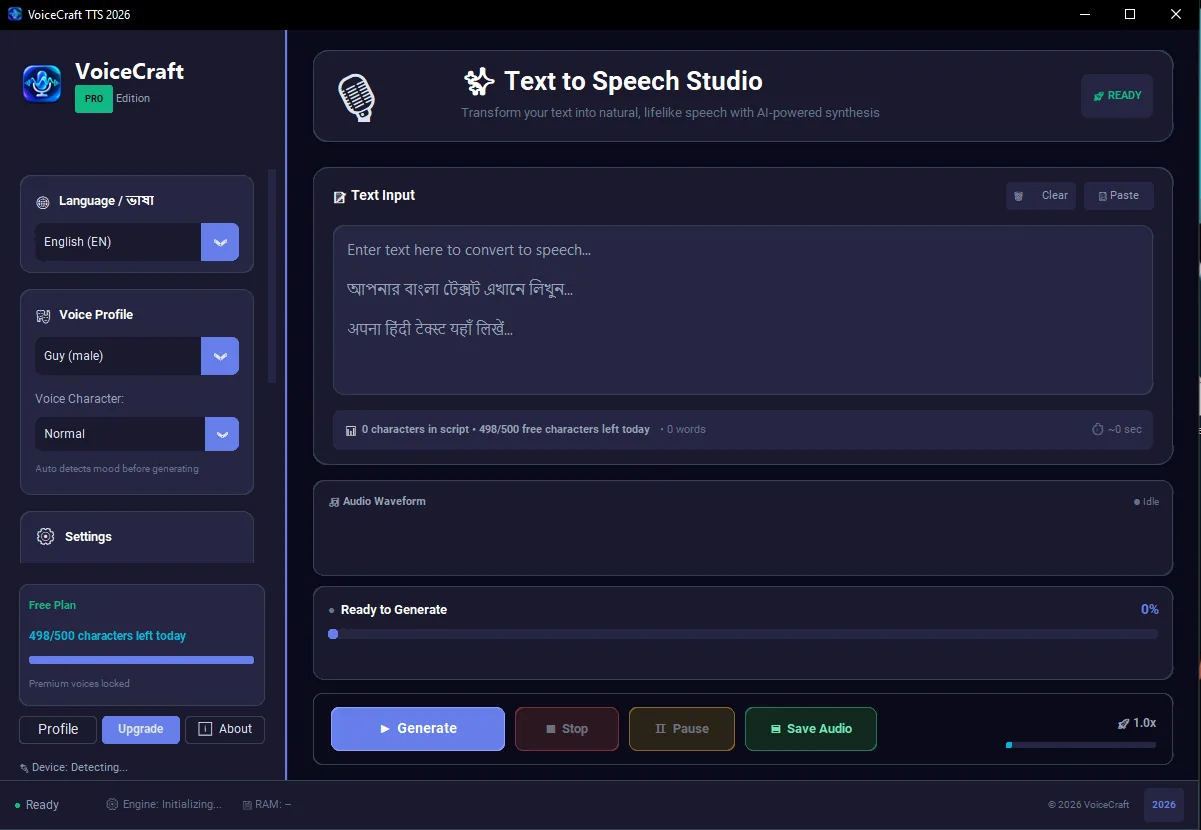
See the actual VoiceCraft TTS workspace before you install.
The pricing page shows the actual app experience so buyers understand what unlocks after payment: more usage, premium voices, account activation and a cleaner production workflow.
500 free characters dailyHindi, Bengali and English workflowMP3/WAV creator export
Start small or save yearly: Creator Monthly is good for first-time paid users. Pro Yearly gives better value when you publish YouTube, reels, education or client audio every week.
LOW RISK START
MonthlyTry paid features first
₹199 /month
Best for testing real projects before yearly upgrade.
For new creators who want to unlock premium workflow for one month without committing to a full year.
200,000 characters for regular monthly work
Premium voice profiles unlocked
English, Hindi and Bengali workflow
1 Windows device
Upgrade to yearly anytime
StarterLight yearly projects
₹499 /year
Costs less than ₹42/month
For students, small pages and occasional creators who need clean voiceover exports a few times each month.
50,000 characters per day
English, Hindi and Bengali voices
1 Windows device
Email support
MP3/WAV export workflow
MOST POPULAR
ProRegular creators
₹999 /year
Best value for weekly publishing
For YouTubers, educators and freelancers who create voiceovers repeatedly and want a smoother production workflow.
Unlimited local generation policy
All supported voices and languages
1 Windows device
Priority activation support
Commercial creator workflows
BusinessTeams and agencies
₹1999 /year
3 device access
For small teams, agencies, studios and businesses that need voiceover production on multiple PCs.
Unlimited local generation policy
English, Hindi and Bengali workflows
3 Windows devices
Priority support
Commercial use workflows
Secure checkout
Click a plan, confirm details, then pay with PhonePe.
VoiceCraft asks for your name, app email and mobile number only after you choose a plan. After payment verification, the plan activates on your account.
PhonePe checkout is active for all visible plans.
Activation flow
No manual setup after payment.
Choose a planSelect Monthly, Starter, Pro or Business based on your workflow.
Pay securelyComplete checkout through PhonePe.
Refresh the appOpen VoiceCraft TTS and your account plan unlocks automatically.